Primary Forms
Exhibition website template · Culture and learning
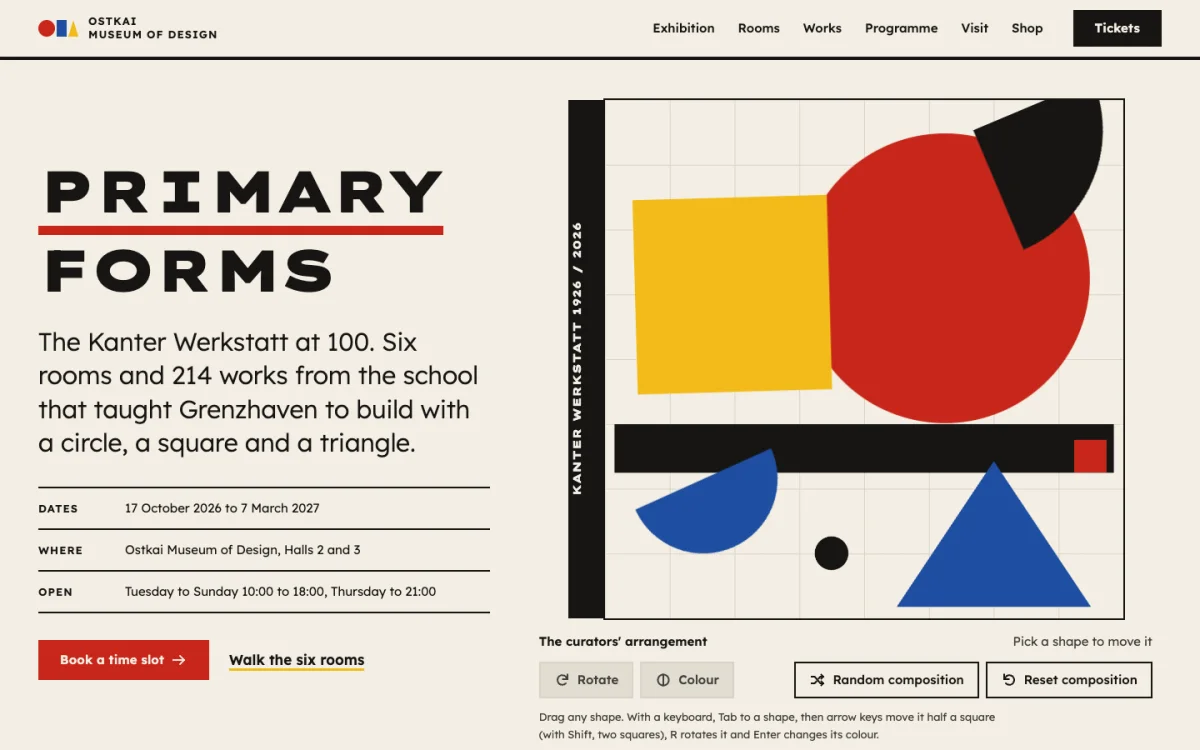
A Bauhaus exhibition poster you can rearrange: red, yellow, blue and black circles, squares, triangles and thick bars on an off-white grid, with wide geometric type turned on its side.
The first screen is a composition of eight primitive shapes on an 8 by 8 grid: a red circle, a yellow square, a black beam, a blue triangle and four smaller pieces. Each shape is a button. Drag it with a mouse or a finger, or Tab to it and use the arrow keys to move it, R to rotate it and Enter to change its colour. Random composition shuffles positions, turns and colours; reset brings back the curators' arrangement. On a phone the stage becomes a 6 by 8 portrait grid with its own arrangement, still draggable by touch.
The shapes run through the rest of the page. The section dividers are drawn from them and take on whatever colours the visitor gave the composition, the floor plan is a square, a rotunda and a triangle, the ten works in the timeline are drawn from them, and the poster in the shop is a live preview of the visitor's own composition. Below the hero: the exhibition, the six-room floor plan, a timeline of works from 1926 to 2026, the talks and workshops programme, timed-entry tickets, visit information, the shop and questions.
Tickets are booked on a calendar grid with hourly entry slots that show the places left, three ticket types with free under 18s, shop add-ons and a running total. The form validates inline, holds the slot with a loading state, can fail and retry, and ends on a drawn ticket stub. Everything is drawn in SVG and CSS from five colours. There are no photographs.
The brand is fictional: Primary Forms, the centenary exhibition of the Kanter Werkstatt at the Ostkai Museum of Design in Grenzhaven. Names, people and figures on the page are invented.
What works
- Hero composition: drag shapes with pointer or touch; keyboard arrows move, Shift moves further, R rotates, Enter recolours, Escape deselects
- Rotate, Colour, Random composition and Reset composition buttons, with a live count of changes
- Dividers, footer mark and shop poster follow the composition's colours and layout
- Floor plan: select a room to read what is in it; arrow keys, Home and End move between rooms; previous and next room buttons
- Programme filter tabs with arrow-key navigation; Book this day jumps to the calendar with that date picked
- Calendar grid: month navigation, arrow keys, Home, End, Page Up and Page Down; closed days, busy and fully booked days marked
- Entry slots with remaining capacity, ticket steppers with limits, poster and catalogue add-ons, live total
- Inline validation, loading, error with retry, success stub, book another visit
- Mobile menu with Escape to close
States you can link to
script.js reads these from the URL, so you can open the page in a given state to review it, screenshot it or show it to an agent.
| Parameter | What it does |
|---|---|
?state=success | books a demo visit (2 adults, 1 under 18, catalogue) and shows the ticket stub. Open ?state=success |
?state=error | submits a demo booking that fails, with the try again alert. Open ?state=error |
?state=loading | a demo booking held in the loading state. Open ?state=loading |
?state=invalid | submits an empty form to show every inline error. Open ?state=invalid |
?state=soldout | picks a fully booked Sunday so every slot shows as full. Open ?state=soldout |
?date=2027-01-14 | opens the calendar with that day picked (any YYYY-MM-DD within the run). Open ?date=2027-01-14 |
?today=2027-02-20 | pretends today is another day of the run, for the calendar and capacity. Open ?today=2027-02-20 |
?room=4 | selects a room on the floor plan (1 to 6). Open ?room=4 |
?programme=workshops | filters the programme (talks, workshops, tours, family). Open ?programme=workshops |
?composition=random | starts from a seeded random composition (add &seed=12 for another). Open ?composition=random |
?open=menu | opens the mobile menu. Open ?open=menu |
Use it
Copy templates/bauhaus/ into your project, or download the zip, which has the Screenery badge script already removed. Colours, type, spacing and radii are custom properties at the top of style.css. This template loads no libraries: only its own files and web fonts.
The docs explain the token pattern and how to move a template into React, Vue, Svelte or Astro. The guide has prompts for handing it to a coding agent.
Inspection
Loaded in Chromium 156.0.8078.4 (Playwright, headless) on 27 November 2026 at 1440, 1024, 768, 390 pixels wide and once more with reduced motion requested. Every check passed at every width.
- 1440 px
- Pass
- 1024 px
- Pass
- 768 px
- Pass
- 390 px
- Pass
- Reduced motion
- Pass
- Page weight
- 235 KB, 7 requests
Requests and transferred size were measured at 1440 pixels on a cold cache and include web fonts and any CDN library. The full result is in the viewer: open the Checks panel. How templates are checked.