Mochi
Companion app landing page template · App screens
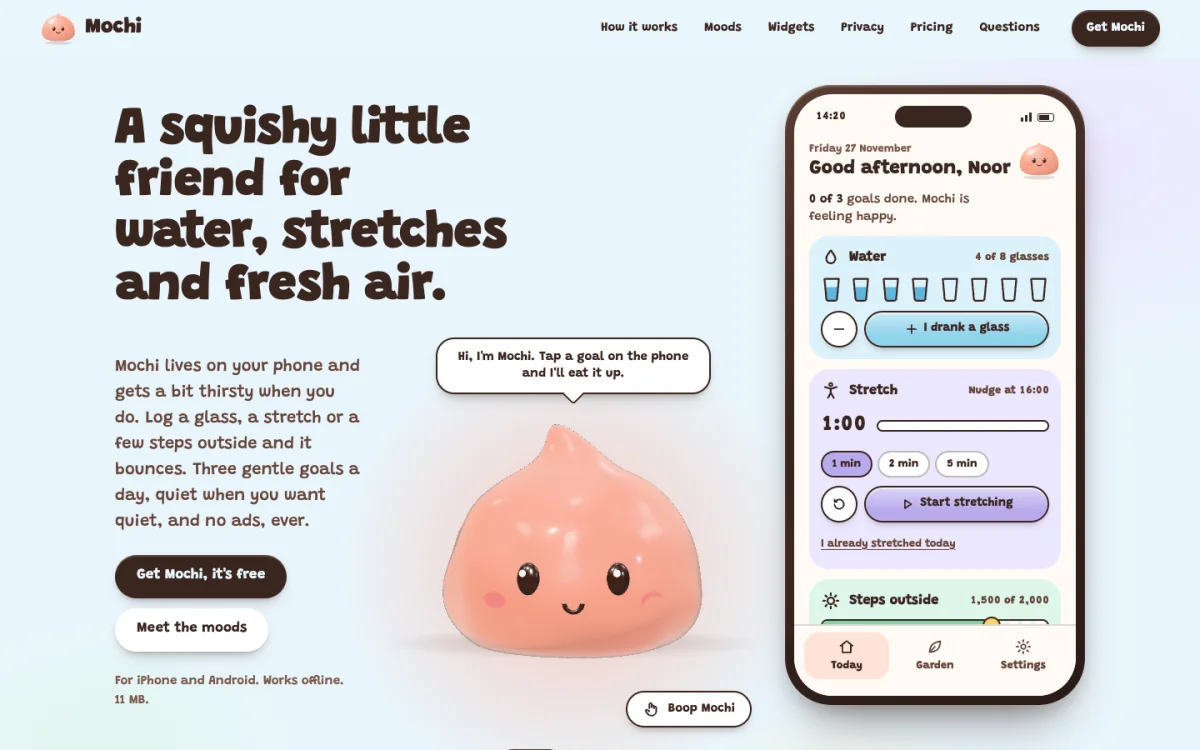
A cute 3D toy box: sky-milk ground with candy pastel trays, a squishy glossy blob with a pulled tip, chunky round lettering, and pill chips that squash under a thumb and spring back.
The hero is Mochi itself: a squishy, glossy blob rendered live in Three.js. Its surface breathes with noise, its eyes follow your pointer and blink, and a boop sends it into a jelly wobble. It has four moods, happy, sleepy, thirsty and proud, each with its own colour, face and idle motion: a slow bob, deep sleepy breaths, a droopy sway, or little hops.
Beside it the Mochi app works on a drawn phone. Log glasses of water, run a real stretch timer and add walks outside, and each one feeds the blob, which squishes, hops and changes mood when the numbers say so. The garden tab grows a plant per day and keeps a streak; the settings tab validates reminder times against quiet hours and tells you when the next nudge is due. The widgets, the privacy lunchbox and the lock screen line all read the same state.
Below are how it works, the four moods explained, home-screen widgets, a privacy section that shows everything stored today with copy and erase, free and supporter pricing with a yearly toggle, a download form with validation, loading, success and error, and questions. Without WebGL, or with reduced motion, a drawn SVG blob with the same four faces stands in.
The brand is fictional: Mochi, a tiny companion app by Tuck and Puddle, a two-person studio in Bristol, that nudges you to drink water, stretch and go outside. Names, people and figures on the page are invented.
What works
- The blob: eyes follow the pointer and blink; click it or press Boop Mochi for a squash-and-stretch wobble
- Mood chips: preview happy, sleepy, thirsty and proud (colour, face, idle motion and speech line)
- Water: add or remove glasses; each glass fills and feeds Mochi
- Stretch timer: pick 1, 2 or 5 minutes, start, pause, reset, or mark it done
- Steps outside: log a short or long walk along a path
- Garden tab: today's plant grows with each goal; the streak counts days with two goals or more
- Settings tab: reminder times with validation against each other and quiet hours, saving state and the next nudge
- Mood tabs with arrow-key support and a button to show each mood on the hero blob
- Small widget plus button logs water and updates the phone
- Privacy lunchbox: live list of what is stored, copy as text, erase today with a confirmation dialog
- Pricing: yearly or monthly supporter price; plan buttons preselect the download form
- Download form: platform and email validation, loading, success and error
- Header menu on small screens, closes with Escape; questions accordion
States you can link to
script.js reads these from the URL, so you can open the page in a given state to review it, screenshot it or show it to an agent.
| Parameter | What it does |
|---|---|
?mood=sleepy | 22:40 in quiet hours: a lavender, sleepy Mochi breathing slowly. Open ?mood=sleepy |
?mood=thirsty | one glass by 14:20, three behind: a pale blue, worried Mochi. Open ?mood=thirsty |
?mood=proud | all three goals done: a butter-yellow Mochi hopping. Open ?mood=proud |
?state=allDone | 17:45 with every goal complete, today's flower grown and a proud blob. Open ?state=allDone |
?state=empty | the first morning: nothing logged, an empty garden and a first-day greeting. Open ?state=empty |
?state=error | fills the download form and shows the failed-to-send state. Open ?state=error |
?state=success | fills the download form and shows the link-sent state. Open ?state=success |
?tab=garden | opens the app on the week garden. Open ?tab=garden |
?tab=settings | opens the app on the reminder settings. Open ?tab=settings |
?nogl | skips WebGL and shows the drawn SVG blob. Open ?nogl |
Use it
Copy templates/blob/ into your project, or download the zip, which has the Screenery badge script already removed. Colours, type, spacing and radii are custom properties at the top of style.css. This template loads no libraries: only its own files and web fonts.
The docs explain the token pattern and how to move a template into React, Vue, Svelte or Astro. The guide has prompts for handing it to a coding agent.
Inspection
Loaded in Chromium 156.0.8078.4 (Playwright, headless) on 27 November 2026 at 1440, 1024, 768, 390 pixels wide and once more with reduced motion requested. Every check passed at every width.
- 1440 px
- Pass
- 1024 px
- Pass
- 768 px
- Pass
- 390 px
- Pass
- Reduced motion
- Pass
- Page weight
- 385 KB, 8 requests
Requests and transferred size were measured at 1440 pixels on a cold cache and include web fonts and any CDN library. The full result is in the viewer: open the Checks panel. How templates are checked.