Bright Street Dental
Dental practice website template · Health and body
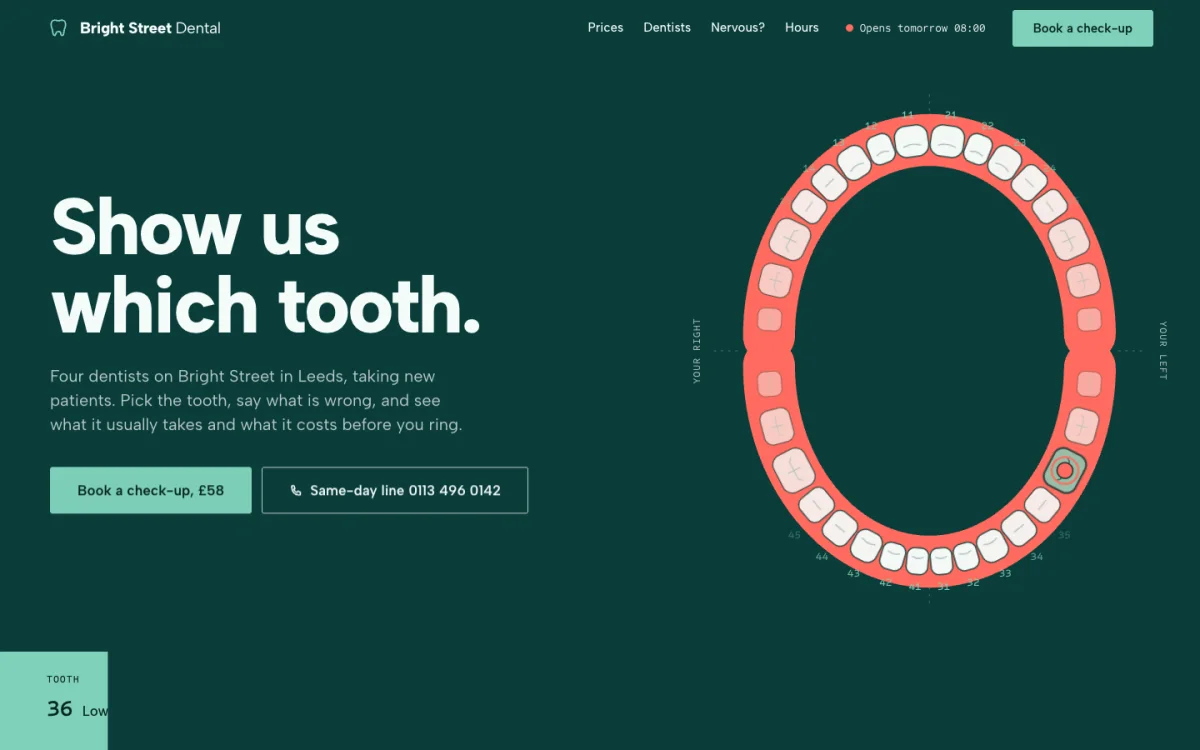
A dental chart as the page: 32 numbered teeth on coral gums; pick a tooth and a concern for treatment, visits and price.
The first screen is the practice's own dental chart: two arches of numbered teeth on coral gums, drawn in SVG from a list of tooth sizes placed along two half ellipses. Choosing a tooth and one of four concerns fills a mint record row with the likely treatment, the number of visits and a guide price, every figure taken from the fixed price list further down.
The rest of the page carries what a dental site cannot leave out: a same-day emergency line whose wording follows the visitor's clock, a 23-line price ledger with a category filter, the four dentists with the days each is in, a written promise to nervous patients, the first visit drawn as a forty-minute bar, opening hours with today marked and a drawn street map.
Teeth added to the chart travel to the new patient form, which validates inline, shows loading, error and success states and can be reset. The themed kit (coded listbox, record-line toasts, amendment-slip dialog, tooltip, segmented radios, switch, checkbox, disclosure) is in one commented Components block driven by four colour tokens.
The brand is fictional: Bright Street Dental, a four-chair private practice in Leeds. Names, people and figures on the page are invented.
What works
- Tooth chart: click a tooth or use the arrow keys to walk the arches; Enter adds it to your chart
- Concern picker (aches, chipped, missing, stained) redraws the chart notation and the record row
- Add to my chart, remove with undo, and clear the chart behind a confirmation dialog
- Price list filter (custom listbox with type-ahead)
- New patient form with inline validation, dentist listbox, nervous-patient switch, loading, error, success and reset
- Questions accordion; open-now status, emergency wording and the roster follow the real clock
States you can link to
script.js reads these from the URL, so you can open the page in a given state to review it, screenshot it or show it to an agent.
| Parameter | What it does |
|---|---|
?tooth=11&concern=chipped | opens with a given tooth (FDI number) and concern selected. Open ?tooth=11&concern=chipped |
?charted=36-ache,11-chipped,25-missing | starts with teeth already on the chart. Open ?charted=36-ache,11-chipped,25-missing |
?state=success | shows the form's success state (also error, loading, invalid). Open ?state=success |
?open=dialog | opens the clear-chart confirmation dialog (also ?open=select for the price filter). Open ?open=dialog |
?notice=1 | shows a chart-note toast that stays put. Open ?notice=1 |
?cat=fil | filters the price list to one category (chk, fil, crn, cos, urg). Open ?cat=fil |
?now=2026-11-29T11:00 | fixes the clock, for example to a Sunday when the practice is closed. Open ?now=2026-11-29T11:00 |
Use it
Copy templates/dentist/ into your project, or download the zip, which has the Screenery badge script already removed. Colours, type, spacing and radii are custom properties at the top of style.css. This template loads no libraries: only its own files and web fonts.
The docs explain the token pattern and how to move a template into React, Vue, Svelte or Astro. The guide has prompts for handing it to a coding agent.
Inspection
Loaded in Chromium 156.0.8078.4 (Playwright, headless) on 27 November 2026 at 1440, 1024, 768, 390 pixels wide and once more with reduced motion requested. Every check passed at every width.
- 1440 px
- Pass
- 1024 px
- Pass
- 768 px
- Pass
- 390 px
- Pass
- Reduced motion
- Pass
- Page weight
- 178 KB, 8 requests
Requests and transferred size were measured at 1440 pixels on a cold cache and include web fonts and any CDN library. The full result is in the viewer: open the Checks panel. How templates are checked.