Parcelo
Logistics SaaS landing page template · Software and web
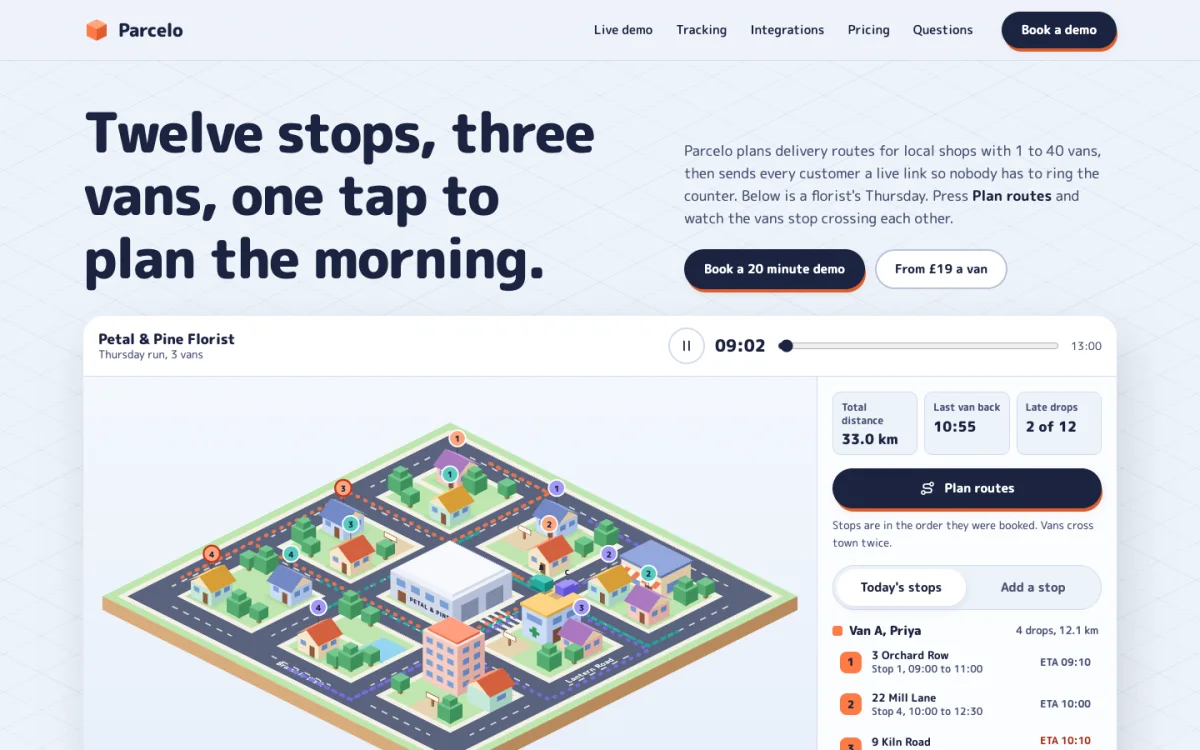
A friendly isometric town drawn in SVG, lit from the upper left with three face tones for every colour, laid out as a working dispatch console with a faint iso lattice under the whole page.
The first screen is a working dispatch console wrapped around an isometric town. Petal & Pine, a florist with three vans, has twelve stops booked for Thursday, and the replay clock drives the vans from the depot along the drawn roads, stopping four minutes at each door. In booking order the runs cross town, two drops miss their windows and the total is 33.0 km. Plan routes sorts the stops into areas, then moves and swaps them between vans while trying every order inside each van: 19.4 km, the last van back 15 minutes sooner and every drop on time. The stats show before and after, and the numbers are the ones the planner computed.
Every house is a button. Its delivery card shows the recipient, parcel, window, ETA or arrival time, driver and drop number, and after the drop a signature or a drawn doorstep photo. The add-stop form picks an address from the street list, checks the recipient and the time window (order, length and the replay clock), then raises a new house on its lot and inserts the stop where it adds the least distance. With ?state=error the routing service is down: Plan routes fails with a clear message and new stops go to the end of the shortest run by hand.
Below are the spreadsheet morning against the Parcelo morning on a shared timeline, the customer's tracking link on a CSS phone that follows the replay clock (with neighbour and note options that close when the van is close), fictional integrations with filters, pilot results as a plain table with their limits stated, a per-van pricing calculator whose sums are done in pence, a demo booking form with validation, loading, error and success, questions and the footer. Everything is drawn in SVG and CSS in one rounded family; there are no images.
The brand is fictional: Parcelo, route planning and live tracking software for local delivery fleets such as bakeries, florists and pharmacies, shown running a florist's Thursday. Names, people and figures on the page are invented.
What works
- Day replay: play, pause and scrub from 09:00 to 13:00; vans drive the road grid and stop at doors
- Plan routes: loading, re-optimised runs, renumbered pins, before and after distance, return time and late drops
- Click or press Enter on any house, or a stop in the list, for its delivery card; Escape closes
- Add a stop: address from the street list, recipient, parcel and time window with inline validation; a house rises on its lot
- Side panel tabs with arrow-key support
- Customer tracking phone: pick a stop, see its window and progress, leave with a neighbour, save a note
- Integration filters
- Pricing: plan, van stepper and slider, monthly or yearly with 15% off; totals add up
- Demo booking: validation, loading, calendar error and booked confirmation
- Questions accordion and a mobile menu
States you can link to
script.js reads these from the URL, so you can open the page in a given state to review it, screenshot it or show it to an agent.
| Parameter | What it does |
|---|---|
?state=optimised | loads with the planned routes and the before and after numbers. Open ?state=optimised |
?stop=12 | opens the delivery card for stop 12 at 10:20 (any stop 1 to 12). Open ?stop=12 |
?state=error | the routing service is down: alert, Plan routes fails, new stops are added by hand. Open ?state=error |
?tab=add | opens the add-stop form. Open ?tab=add |
?form=success | shows a booked demo. Open ?form=success |
?form=error | shows the booking form filled in with the calendar error; trying again succeeds. Open ?form=error |
Use it
Copy templates/isocity/ into your project, or download the zip, which has the Screenery badge script already removed. Colours, type, spacing and radii are custom properties at the top of style.css. This template loads no libraries: only its own files and web fonts.
The docs explain the token pattern and how to move a template into React, Vue, Svelte or Astro. The guide has prompts for handing it to a coding agent.
Inspection
Loaded in Chromium 156.0.8078.4 (Playwright, headless) on 27 November 2026 at 1440, 1024, 768, 390 pixels wide and once more with reduced motion requested. Every check passed at every width.
- 1440 px
- Pass
- 1024 px
- Pass
- 768 px
- Pass
- 390 px
- Pass
- Reduced motion
- Pass
- Page weight
- 374 KB, 9 requests
Requests and transferred size were measured at 1440 pixels on a cold cache and include web fonts and any CDN library. The full result is in the viewer: open the Checks panel. How templates are checked.