Yuzen
Smart kettle product page template · Shops and makers
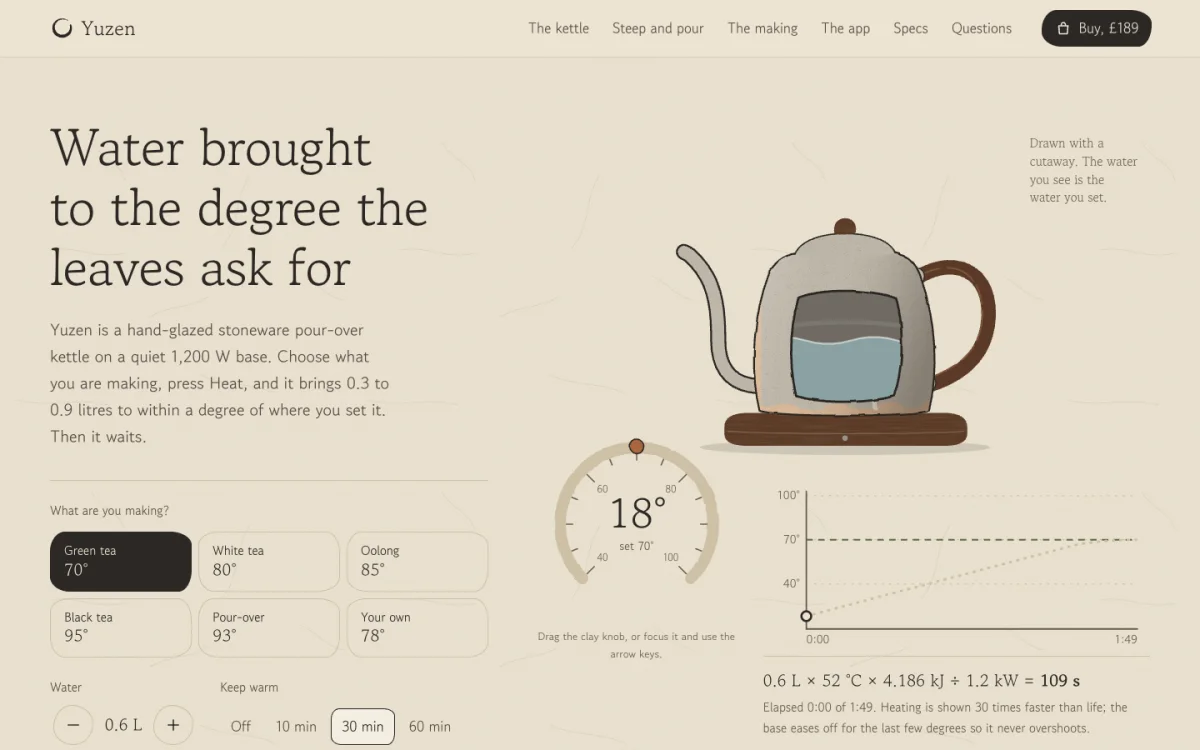
Wabi-sabi on rice paper: fibre-textured ground, ash ink, raw clay and moss, uneven pebble shapes and brush strokes, and a hand-drawn stoneware kettle whose water you can heat to the degree.
The first screen is the kettle itself, drawn in SVG: a matte wood-ash glaze stopping short of a raw clay foot, a steamed walnut handle and a cutaway that shows the water. Choose green tea (70°C), white (80°C), oolong (85°C), black (95°C), pour-over (93°C) or your own temperature, validated from 40 to 100°C, or drag the clay knob on the dial. Press Heat and the water warms along a curve whose length comes from the formula shown under it: litres x ΔT x 4.186 kJ / 1.2 kW, played 30 times faster than life. Steam leaves the spout near the target, the light turns moss, and a real keep-warm timer counts down. Lift the kettle mid-heat and it stops with an error, then carries on when set down.
Below it, a steeping timer knows each tea's infusions (three for green tea: 60, 20 and 40 seconds) and moves through them, and the pour guide walks a 15 g to 250 g pour-over from a 30 g bloom through three pulses on a drawn arc. The making covers the clay body, the three glazes and the walnut. The app section is a CSS phone that mirrors the kettle above and runs real warm schedules, such as 06:40 on weekdays, with validation for time, temperature, days and clashes.
Specs agree with the simulation (0.9 L from 18°C to 100°C in about 4 min 17 s). Care, the buy box with ash, moss and a sold-out kiln-red glaze that recolours both drawings, plug choice, quantity, loading, error and success, questions and the footer close the page. Everything is drawn; there are no photographs.
The brand is fictional: Yuzen, a hand-glazed stoneware pour-over kettle on a 1,200 W walnut base, from a small workshop in Stroud. Names, people and figures on the page are invented.
What works
- Tea and coffee presets with target temperatures; custom temperature with inline validation (empty, not a number, not whole, below 40, above 100)
- Temperature dial: drag the knob, click the arc, or Arrow keys, Page Up and Down, Home and End
- Water volume stepper from 0.3 to 0.9 L, which changes the water level and the time estimate
- Heat and stop: an eased heating curve, live formula, elapsed time, steam near the target, bubbles near a boil
- Keep warm off, 10, 30 or 60 minutes with a real countdown; the water cools when it ends
- Lift the kettle: stops heating with an error state, resumes when set down
- Steeping timer: four teas, per-infusion durations, start, pause, reset, auto-advance to the next infusion
- Pour guide: bloom and three pulses on an animated arc with gram targets and step list
- App phone: mirrors the kettle, schedule switches, delete, new schedule form with validation and clash detection, next warm time
- Buy box: glaze recolours both kettles, sold-out glaze with notify form, plug validation, quantity, loading, error and success
- Header menu on small screens with Escape to close; questions accordion
States you can link to
script.js reads these from the URL, so you can open the page in a given state to review it, screenshot it or show it to an agent.
| Parameter | What it does |
|---|---|
?tea=oolong | opens with oolong (85°C) chosen and the steeping timer set to four infusions. Open ?tea=oolong |
?state=heating | starts heating and jumps partway up the curve. Open ?state=heating |
?state=ready | water at the target, steam at the spout, keep warm counting down. Open ?state=ready |
?state=error | the kettle was lifted off its base mid-heat; heating stopped with the red light. Open ?state=error |
?glaze=moss | both kettle drawings in the moss glaze. Open ?glaze=moss |
?glaze=kiln | kiln-red chosen: sold out, the add button is unavailable and the notify form shows. Open ?glaze=kiln |
?buy=success | adds a UK-plug kettle to the bag and shows the success note. Open ?buy=success |
?buy=error | the first add fails with a retry; trying again succeeds. Open ?buy=error |
Use it
Copy templates/kettle/ into your project, or download the zip, which has the Screenery badge script already removed. Colours, type, spacing and radii are custom properties at the top of style.css. This template loads no libraries: only its own files and web fonts.
The docs explain the token pattern and how to move a template into React, Vue, Svelte or Astro. The guide has prompts for handing it to a coding agent.
Inspection
Loaded in Chromium 156.0.8078.4 (Playwright, headless) on 27 November 2026 at 1440, 1024, 768, 390 pixels wide and once more with reduced motion requested. Every check passed at every width.
- 1440 px
- Pass
- 1024 px
- Pass
- 768 px
- Pass
- 390 px
- Pass
- Reduced motion
- Pass
- Page weight
- 217 KB, 8 requests
Requests and transferred size were measured at 1440 pixels on a cold cache and include web fonts and any CDN library. The full result is in the viewer: open the Checks panel. How templates are checked.