Tilecast
Streaming TV app template · App screens
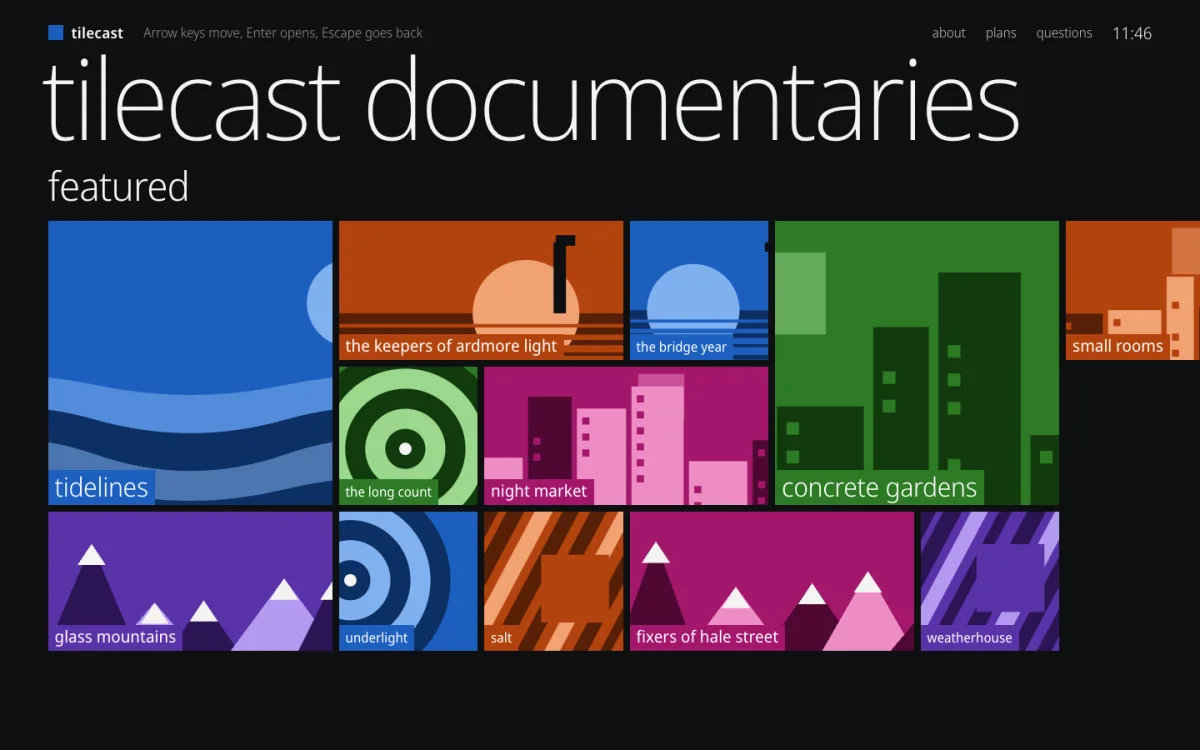
A 2010-era tile interface for the television: flat solid colour tiles in a strict grid on a dark ground, huge light lowercase headings that bleed off the edge as a panorama, and live tiles that flip to show a second face.
The first screen is the app as it would run on a television: a sideways panorama of hubs (featured, continue, categories, my list, search) under a huge lowercase title that drifts slower than the tiles. The arrow keys move a white focus ring from tile to tile like a remote, Enter opens, Escape or Backspace goes back. Live tiles flip every few seconds to show their second face: a new episode, minutes left, a count.
A title opens on a detail page with its poster, meta line, synopsis, a resume or play button, add to my list, and the episode list with watched progress. Play opens the player: the poster drifts while playing, the scrub bar seeks, subtitles follow the position and can be turned off, and leaving saves your place in the continue hub. Search uses an on-screen keyboard grid, and the category tiles filter it. Below the app are a short about, two plans with a free-week form, questions and the footer.
Every poster is drawn in SVG from one of six flat patterns in the title's tile colour. There are no photographs, gradients or shadows. On a phone the panorama becomes vertical sections and the layers go full screen.
The brand is fictional: Tilecast, a streaming service for documentaries built for the television and its remote. Names, people and figures on the page are invented.
What works
- Arrow-key spatial navigation with a visible focus ring across panorama, detail and player
- Live tiles flip on a timer (held still with reduced motion)
- Title detail: resume or play, add to or remove from my list, episode list
- Player: play and pause (button or space), scrub bar, subtitles toggle, progress saved to continue
- Search with an on-screen keyboard, physical typing, delete and clear; category tiles filter results
- Catalogue error with retry and loading tiles
- Free-week form: plan choice, inline email validation, loading, success and error
States you can link to
script.js reads these from the URL, so you can open the page in a given state to review it, screenshot it or show it to an agent.
| Parameter | What it does |
|---|---|
?view=detail&title=3 | opens the detail page for Glass Mountains (any title 1 to 12). Open ?view=detail&title=3 |
?state=playing | opens the player on episode 2 of Glass Mountains at 23:15 with subtitles on. Open ?state=playing |
?state=empty | a new profile: continue and my list are empty. Open ?state=empty |
?state=error | the catalogue failed to load, with a retry that shows loading tiles. Open ?state=error |
?form=error | submits the free-week form and shows the failed-to-send state. Open ?form=error |
Use it
Copy templates/metro/ into your project, or download the zip, which has the Screenery badge script already removed. Colours, type, spacing and radii are custom properties at the top of style.css. This template loads no libraries: only its own files and web fonts.
The docs explain the token pattern and how to move a template into React, Vue, Svelte or Astro. The guide has prompts for handing it to a coding agent.
Inspection
Loaded in Chromium 156.0.8078.4 (Playwright, headless) on 27 November 2026 at 1440, 1024, 768, 390 pixels wide and once more with reduced motion requested. Every check passed at every width.
- 1440 px
- Pass
- 1024 px
- Pass
- 768 px
- Pass
- 390 px
- Pass
- Reduced motion
- Pass
- Page weight
- 108 KB, 6 requests
Requests and transferred size were measured at 1440 pixels on a cold cache and include web fonts and any CDN library. The full result is in the viewer: open the Checks panel. How templates are checked.