Grain
Photo editor app template · App screens
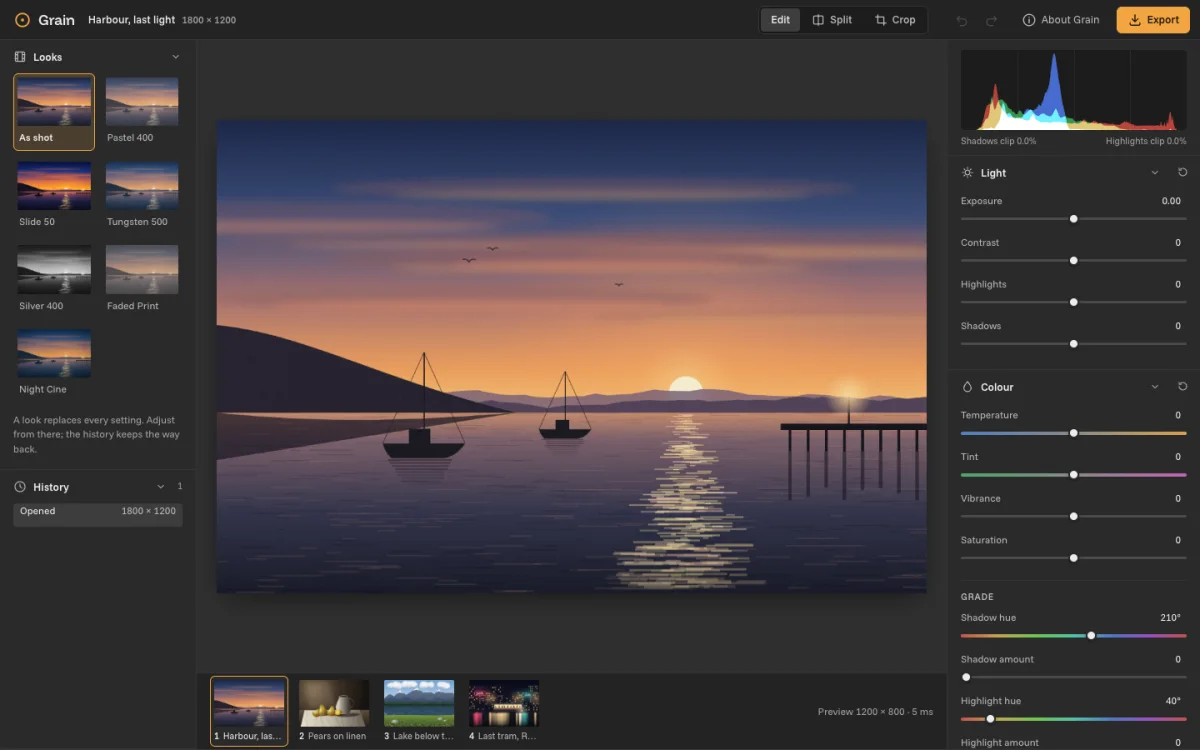
A professional darkroom tool at full finish: neutral mid-dark greys so colour judgement stays honest, one amber safelight accent, small exact labels with a number beside every slider, and four photographs painted in code so every pixel on screen is really being processed.
This template is the app itself, filling the first viewport. The top bar carries the document name and size, the Edit, Split and Crop switch, undo and redo, a link to About Grain and Export. On the left are seven looks (As shot plus six film looks, each thumbnail rendered from the current photo) and the history list; in the middle the photo on a neutral grey stage; on the right the live RGB histogram with shadow and highlight clipping, then collapsible panels for Light, Colour with a shadow and highlight grade, the tone curve, grain and vignette, and crop. A filmstrip of four photos runs below, each thumbnail showing that photo's own edit.
Every pixel is processed in plain JavaScript on a canvas. White balance and exposure work as channel gains in linear light with a soft shoulder, contrast pivots on middle grey, shadows and highlights are bumps that keep black and white fixed, and the master and red, green and blue curves are monotone cubic splines folded into the same lookup tables. Colour, grade, vignette and grain follow per pixel; grain is strongest in the midtones and is generated again at export size so it keeps its scale. The before and after split has a draggable handle, crop offers six aspect ratios with a rule-of-thirds frame, and Export writes a real PNG after a progress bar that counts rows.
Below the app, an About Grain page explains the order of operations, shows a rendered contact sheet and a table of the six looks with their actual numbers, lists the keyboard shortcuts, then pricing with a monthly and yearly switch, questions and the footer. Under 1100 pixels the panels fold into a bottom sheet with tabs and the histogram floats over the stage. The four photographs are painted in code: a harbour at dusk, pears on linen, a mountain lake and a night tram.
The brand is fictional: Grain, a browser photo editor for film-look edits, made by Grain Darkroom Ltd in Leeds. Names, people and figures on the page are invented.
What works
- 18 sliders with number fields: arrow keys and Page Up/Down, type a value and press Enter (validated and clamped with a message), arrows in the field step, double-click resets
- Seven looks that replace every setting, with thumbnails rendered from the current photo
- Tone curve editor: RGB, red, green and blue channels, click to add points, drag, arrow keys move the focused point, Delete or double-click removes, Start from shapes
- History with undo and redo (Cmd/Ctrl+Z, Shift+Cmd/Ctrl+Z, Ctrl+Y), click any step to jump, redo branch shown struck through
- Before and after split with a draggable, keyboard-operable handle; hold backslash to see the photo as shot
- Crop with Original, 1:1, 4:5, 5:7, 16:9 and Free; drag to move, corner handles to resize, arrows and plus/minus from the keyboard, Enter applies, Escape cancels
- Live RGB histogram with clipping percentages, and a luminance histogram behind the curve
- Filmstrip of four painted photos with arrow-key navigation and 1 to 4 shortcuts; each keeps its own edit and history
- Collapsible panels and per-panel reset
- Export dialog: file name validation, three sizes, real row-by-row progress, success with file size and time, error with retry, PNG download
- Bottom-sheet tabs on narrow screens with arrow-key navigation
- About: contact sheet that applies a look, monthly and yearly pricing switch, questions accordion
States you can link to
script.js reads these from the URL, so you can open the page in a given state to review it, screenshot it or show it to an agent.
| Parameter | What it does |
|---|---|
?photo=3 | opens the third photo in the filmstrip (1 to 4). Open ?photo=3 |
?preset=portra | applies the Pastel 400 look; also chrome, tungsten, silver, faded, cine. Open ?preset=portra |
?view=split | opens the before and after split view. Open ?view=split |
?tool=crop | opens the crop tool. Open ?tool=crop |
?panel=curve | shows the tone curve panel (any tab name: looks, light, colour, curve, effects, crop, history). Open ?panel=curve |
?state=exporting | opens Export and holds the progress at 62%. Open ?state=exporting |
?state=error | opens Export and shows the failed export at 41% with Try again. Open ?state=error |
?photo=4&preset=cine&view=split | the night tram under Night Cine, split against the original. Open ?photo=4&preset=cine&view=split |
Use it
Copy templates/photo/ into your project, or download the zip, which has the Screenery badge script already removed. Colours, type, spacing and radii are custom properties at the top of style.css. This template loads no libraries: only its own files and web fonts.
The docs explain the token pattern and how to move a template into React, Vue, Svelte or Astro. The guide has prompts for handing it to a coding agent.
Inspection
Loaded in Chromium 156.0.8078.4 (Playwright, headless) on 27 November 2026 at 1440, 1024, 768, 390 pixels wide and once more with reduced motion requested. Every check passed at every width.
- 1440 px
- Pass
- 1024 px
- Pass
- 768 px
- Pass
- 390 px
- Pass
- Reduced motion
- Pass
- Page weight
- 189 KB, 7 requests
Requests and transferred size were measured at 1440 pixels on a cold cache and include web fonts and any CDN library. The full result is in the viewer: open the Checks panel. How templates are checked.