Sprout & Soil
Plant care app landing page template · App screens
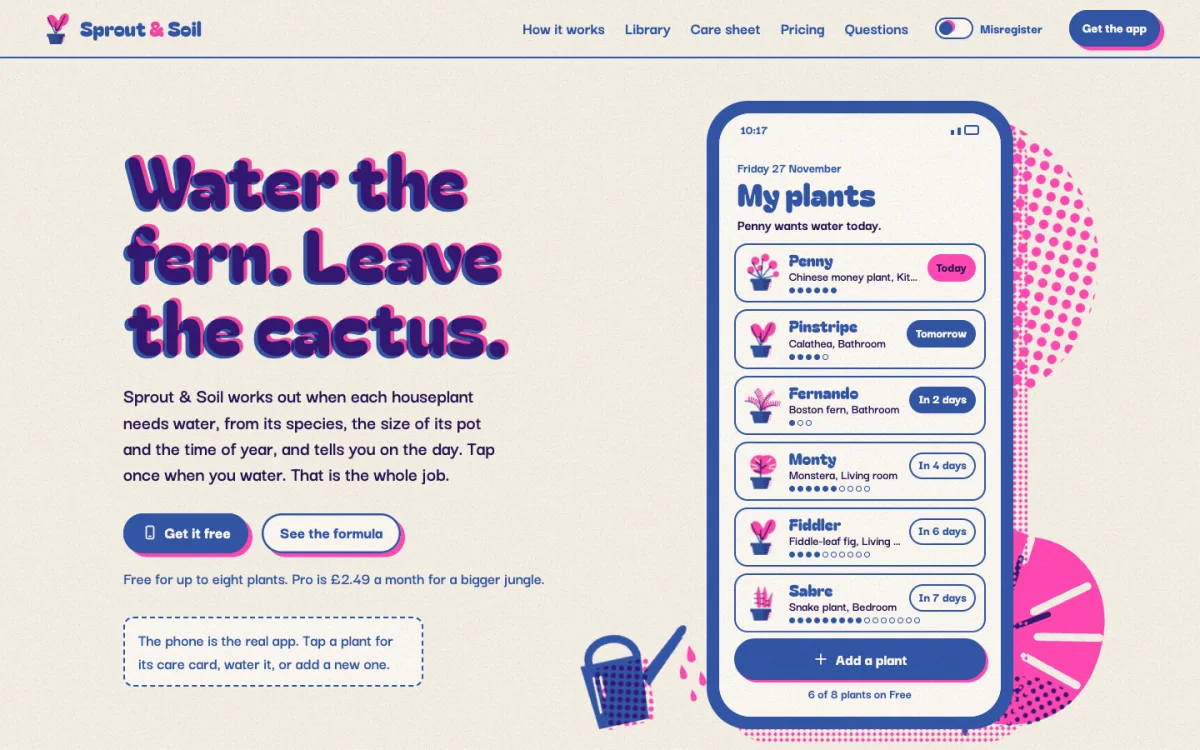
A risograph print in fluorescent pink and medium blue on warm paper: overprinted inks that turn violet where they cross, grain, halftone dots, and plates that sit a little out of register.
The page is printed in two spot inks, fluorescent pink and medium blue, on warm off-white paper. Every headline is set twice, blue and a pink copy on its own plate, and every drawing (pots, leaves, a watering can) is two separate ink layers that overprint with multiply, so they go violet where they cross. Paper grain and halftone dots sit over everything. The Misregister switch in the header slides the plates apart and lets them drift, the way a riso drum does when it will not hold; with reduced motion they simply sit further apart.
The phone in the first screen is the working app. My plants lists six plants sorted by when they need water, each with a countdown and a row of dots for the days gone since it was last watered. Tap one for its care card: light, water amount, humidity, the sum behind its schedule and a four-week calendar of past waterings, planned ones and overdue days. Water now resets the countdown and moves the calendar, with an undo. Add a plant searches sixteen species, asks for room, pot size and when it was last watered, validates each, shows the formula live and respects the eight-plant Free limit.
Below the phone the schedule maths is laid out (species base days × pot factor × season factor, with this season marked), the plant library filters by light and can send any species straight into the phone, and the care sheet for a plant sitter follows the app and prints in the same two inks. Pricing switches between monthly and yearly, the download form has inline validation with loading, error and success states, and questions and a footer close the page. There are no images: everything is SVG and CSS.
The brand is fictional: Sprout & Soil, a small plant care app from Bristol that tells you when to water each houseplant. Names, people and figures on the page are invented.
What works
- My plants list: countdowns worked out from each plant's schedule and last watered date, sorted by due, overdue plants turn pink
- Care card: light, water, humidity, the formula, a four-week calendar with watered, planned, overdue and today
- Water now: resets the countdown and the calendar, toast with undo, disabled once watered today
- Add a plant: species search with arrow keys and Enter, room and pot chips, last watered, live schedule preview, specific validation, loading, eight-plant Free limit
- Misregister switch: separates the pink and blue plates across the page and lets them drift (static with reduced motion)
- Library: filter by low, medium or bright light; Add sends a species into the phone's add sheet
- Care sheet: rebuilt from the phone's plants with tick boxes for four weeks; Print uses a two-ink print stylesheet
- Pricing: monthly and yearly toggle with the saving worked out
- Download form: email and phone validation, loading, error with retry, success, send to another email
- Questions accordion; Escape closes the add sheet and the care card
States you can link to
script.js reads these from the URL, so you can open the page in a given state to review it, screenshot it or show it to an agent.
| Parameter | What it does |
|---|---|
?plant=monstera | opens Monty the monstera's care card (any plant id: monstera, snake, calathea, pilea, fern, fig). Open ?plant=monstera |
?state=thirsty | three plants overdue and highlighted pink, one due today. Open ?state=thirsty |
?add=open | opens the add-a-plant sheet; add &species=pothos to preselect a species. Open ?add=open |
?state=error | fills and submits the download form, which fails to send; sending again succeeds. Open ?state=error |
?state=success | fills and submits the download form and shows the sent message. Open ?state=success |
?season=winter | works every schedule out with the winter factor (spring, summer, autumn, winter). Open ?season=winter |
?mis=1 | starts with the plates misregistered. Open ?mis=1 |
Use it
Copy templates/riso/ into your project, or download the zip, which has the Screenery badge script already removed. Colours, type, spacing and radii are custom properties at the top of style.css. This template loads no libraries: only its own files and web fonts.
The docs explain the token pattern and how to move a template into React, Vue, Svelte or Astro. The guide has prompts for handing it to a coding agent.
Inspection
Loaded in Chromium 156.0.8078.4 (Playwright, headless) on 27 November 2026 at 1440, 1024, 768, 390 pixels wide and once more with reduced motion requested. Every check passed at every width.
- 1440 px
- Pass
- 1024 px
- Pass
- 768 px
- Pass
- 390 px
- Pass
- Reduced motion
- Pass
- Page weight
- 170 KB, 7 requests
Requests and transferred size were measured at 1440 pixels on a cold cache and include web fonts and any CDN library. The full result is in the viewer: open the Checks panel. How templates are checked.