Halden PS-1
Hardware product page template · Shops and makers
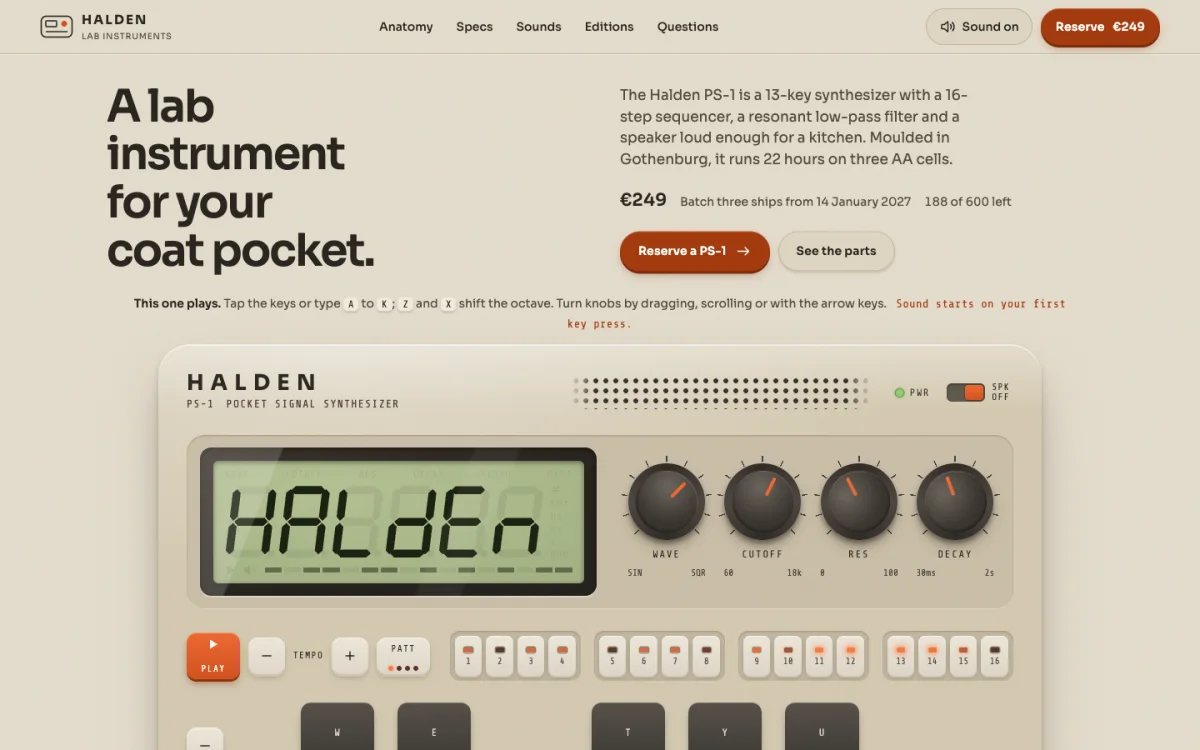
A moulded putty-plastic 1980s lab instrument: screen-printed labels, smoked acrylic over a green segment LCD, rubber keys and one vermilion signal colour.
The page is moulded putty plastic and the hero is the instrument itself, drawn at full width in CSS and SVG. It plays: 13 rubber keys you can tap, slide across or type on the A to K row, four knobs for waveform, filter cutoff, resonance and decay, and a 16-step sequencer with tempo, four patterns and a play button. A six-digit segment LCD behind smoked acrylic shows whichever parameter you touch, with its annunciators lighting up. Sound only starts after your first press, and a mute toggle in the header and a speaker switch on the device silence it.
Below the instrument: an exploded drawing of its nine parts that highlights on hover or focus, a printed test sheet of specs, six sound presets that load into the instrument and play a phrase, and the two editions side by side with a shell colour picker that recolours the drawn device, the comparison drawings and the order. The order panel adds edition, colour, quantity, a wool case and ship-to into a total that adds up, beside a reservation form with inline validation, loading, error and a confirmation ticket. Shipping, production runs, warranty and questions close the page.
Everything is drawn in CSS and SVG. There are no photographs and no libraries.
The brand is fictional: Halden Lab Instruments, a small hardware maker in Gothenburg, and its PS-1 pocket synthesizer. Names, people and figures on the page are invented.
What works
- Keyboard: 13 keys by pointer, touch (with glissando) and the A W S E D F T G Y H U J K keys; Z and X shift the octave
- Four knobs with the slider role: drag up or down, scroll, arrow keys, Page Up/Down, Home and End
- 16-step sequencer: toggle steps (new steps take the last key played), play and stop, tempo, four patterns
- Segment LCD shows the parameter, note, tempo or pattern being changed
- Mute toggle in the header and speaker switch on the device
- Sound presets: audition one and it loads into the instrument
- Exploded view: hover or focus a part in the list or the drawing; click to pin
- Shell colour picker and edition choice recolour and restyle the drawn device
- Order panel: edition, colour, quantity, case and ship-to with a live total
- Reservation form: inline validation with country-aware postcodes, loading, error with retry, success ticket
- Questions accordion
States you can link to
script.js reads these from the URL, so you can open the page in a given state to review it, screenshot it or show it to an agent.
| Parameter | What it does |
|---|---|
?state=playing | the sequencer running (silent until you press a key). Open ?state=playing |
?state=muted | mute on; header button, speaker switch and LCD icon all show it. Open ?state=muted |
?lcd=cutoff | holds a reading on the LCD (wave, cutoff, res, decay, tempo, patt). Open ?lcd=cutoff |
?edition=bench | the Bench edition with the brushed aluminium panel and turned knobs. Open ?edition=bench |
?colour=graphite | recolours the device and drawings (putty, bone, sage, graphite). Open ?colour=graphite |
?part=board | pins a part in the exploded view. Open ?part=board |
?preset=4 | loads a sound preset (1 to 6) into the instrument. Open ?preset=4 |
?pattern=2 | loads a sequencer pattern (1 to 4). Open ?pattern=2 |
?state=invalid | submits the empty form to show every inline error. Open ?state=invalid |
?state=loading | a filled form, stuck sending. Open ?state=loading |
?state=error | a filled form whose first send fails, with Try again. Open ?state=error |
?state=success | a filled form, reserved, with the order ticket. Open ?state=success |
Use it
Copy templates/synth/ into your project, or download the zip, which has the Screenery badge script already removed. Colours, type, spacing and radii are custom properties at the top of style.css. This template loads no libraries: only its own files and web fonts.
The docs explain the token pattern and how to move a template into React, Vue, Svelte or Astro. The guide has prompts for handing it to a coding agent.
Inspection
Loaded in Chromium 156.0.8078.4 (Playwright, headless) on 27 November 2026 at 1440, 1024, 768, 390 pixels wide and once more with reduced motion requested. Every check passed at every width.
- 1440 px
- Pass
- 1024 px
- Pass
- 768 px
- Pass
- 390 px
- Pass
- Reduced motion
- Pass
- Page weight
- 185 KB, 7 requests
Requests and transferred size were measured at 1440 pixels on a cold cache and include web fonts and any CDN library. The full result is in the viewer: open the Checks panel. How templates are checked.