Keel
Project tracker app template · App screens
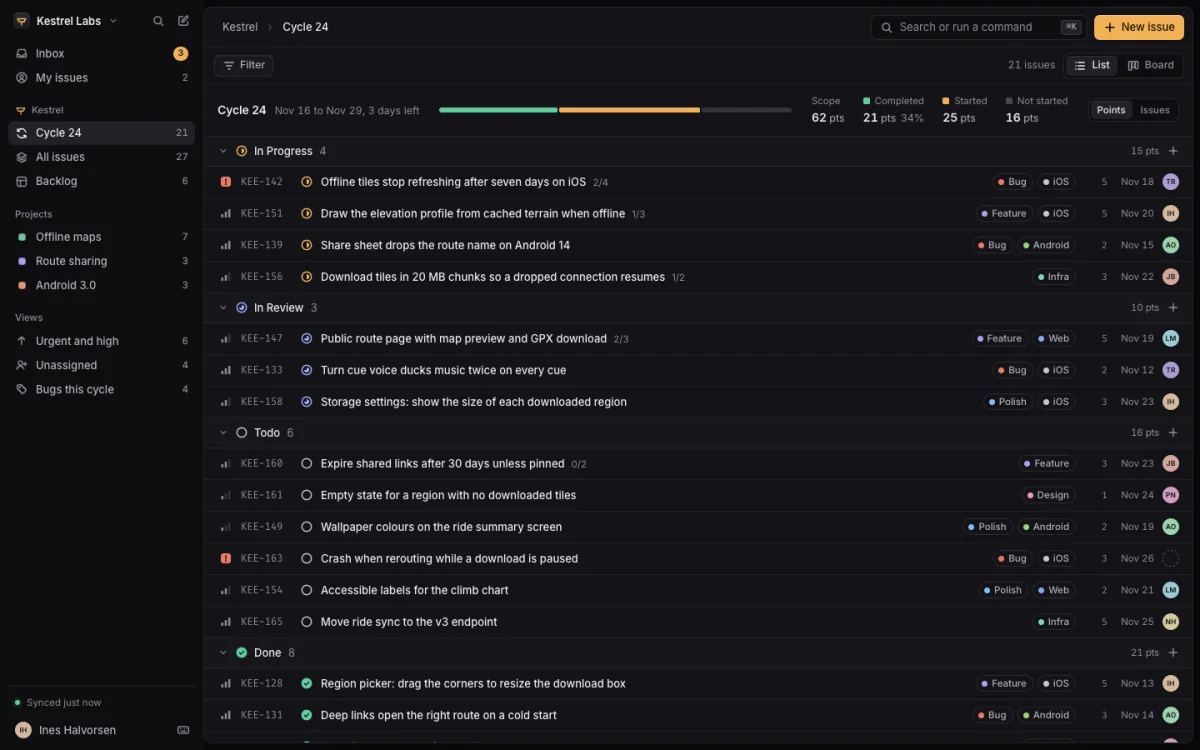
A modern dark product UI at full finish: near-black layered greys, hairline borders, one amber accent like a riding light, crisp 13px Inter with Fira Code for ids and keys, and 150 to 200ms transitions.
This template is the app itself, filling the viewport. The sidebar holds the workspace menu, an inbox with an unread count, My issues, the current cycle, all issues and the backlog, three projects and three saved views, with a sync status and the signed-in member at the foot. The top bar carries breadcrumbs, a search button that opens the command menu and New issue. Below it sit the filter chips, the issue count and the List and Board switch, then the Cycle 24 strip: scope, completed, started and not started, in points or issue counts, always adding up because they are worked out from the issues on screen.
The list groups issues by status with priority glyphs, mono ids, labels, estimates, dates and initials avatars. The board shows the same issues in columns; cards move by pointer drag (hold to lift on touch) or from the keyboard with Space, the arrow keys and Space again. Opening an issue slides in a detail panel with editable title and description, property menus, a sub-issue checklist, an activity timeline that records every change, and a comment box with validation, a posting state and an offline failure that keeps the draft.
Cmd or Ctrl+K opens the command palette: fuzzy search over 27 issues and every command, with highlighted matches, arrow keys and Enter, and nested pages for Change status, Change priority, Assign to and Filter by label. Single keys do the rest: C to create, / to search, G then B for the board, J and K to move, S, P and I on the focused issue, and ? for the shortcut sheet. On phones the sidebar is a drawer, the board scrolls sideways inside its own frame and the detail panel is a full sheet. Every icon and glyph is drawn inline in SVG with one stroke weight.
The brand is fictional: Keel, a keyboard-first issue tracker, here running the Kestrel Labs workspace: nine people building a cycling route app. Names, people and figures on the page are invented.
What works
- Command palette: Cmd/Ctrl+K or the search button, fuzzy search with highlights, arrow keys and Enter, Backspace to go back a page
- Palette commands: create issue, change status, change priority, assign to me, assign to, copy link, switch board or list, go to inbox, my issues, cycle, backlog or a project, filter by label, shortcuts, go offline or online
- Shortcuts: C create, / search, ? sheet, G then B, L, I, M or C, J and K to move, S status, P priority, I assign to me, Esc closes
- Sidebar navigation across inbox, my issues, cycle, all issues, backlog, projects and saved views, with live counts
- Inbox: open a notification to read it and jump to the issue, mark all as read
- Filters: multi-select by priority, assignee and label with removable chips and a designed no-match state
- List: collapse status groups, focus rows with J and K, open with Enter or click
- Board: drag cards between columns and within a column with pointer or touch hold, auto-scroll near edges, or move them from the keyboard
- Detail panel: edit title and description, change status, priority, assignee, labels, estimate and project, previous and next, copy link
- Sub-issues: check off, add with Enter, remove; activity timeline logs every change
- Comment box: empty and length validation, posting state, offline failure with the draft kept and a retry
- Create issue: title validation (empty, too short, duplicate), property pills with menus, Create more, Cmd/Ctrl+Enter, created toast with View
- Cycle strip: points or issues, numbers recompute on every move
- Offline mode: sync banner with retry, queued change count, pending dots on changed issues, back online syncs them
States you can link to
script.js reads these from the URL, so you can open the page in a given state to review it, screenshot it or show it to an agent.
| Parameter | What it does |
|---|---|
?view=board | opens the board instead of the list. Open ?view=board |
?issue=KEE-142 | opens the detail panel on an issue (any id, for example KEE-163). Open ?issue=KEE-142 |
?state=empty | a fresh cycle with no issues and the designed empty state. Open ?state=empty |
?state=offline | the sync error banner, an offline sync status and one change waiting to sync; comments fail to post. Open ?state=offline |
?palette=open | opens the command palette. Open ?palette=open |
?create=open | opens the create issue dialog. Open ?create=open |
?keys=open | opens the keyboard shortcuts sheet. Open ?keys=open |
?nav=inbox | starts on a sidebar destination: inbox, my, all, backlog, project-maps, view-urgent and others. Open ?nav=inbox |
Use it
Copy templates/tracker/ into your project, or download the zip, which has the Screenery badge script already removed. Colours, type, spacing and radii are custom properties at the top of style.css. This template loads no libraries: only its own files and web fonts.
The docs explain the token pattern and how to move a template into React, Vue, Svelte or Astro. The guide has prompts for handing it to a coding agent.
Inspection
Loaded in Chromium 156.0.8078.4 (Playwright, headless) on 27 November 2026 at 1440, 1024, 768, 390 pixels wide and once more with reduced motion requested. Every check passed at every width.
- 1440 px
- Pass
- 1024 px
- Pass
- 768 px
- Pass
- 390 px
- Pass
- Reduced motion
- Pass
- Page weight
- 282 KB, 7 requests
Requests and transferred size were measured at 1440 pixels on a cold cache and include web fonts and any CDN library. The full result is in the viewer: open the Checks panel. How templates are checked.