Weyl Sato
Architecture studio portfolio template · Professional
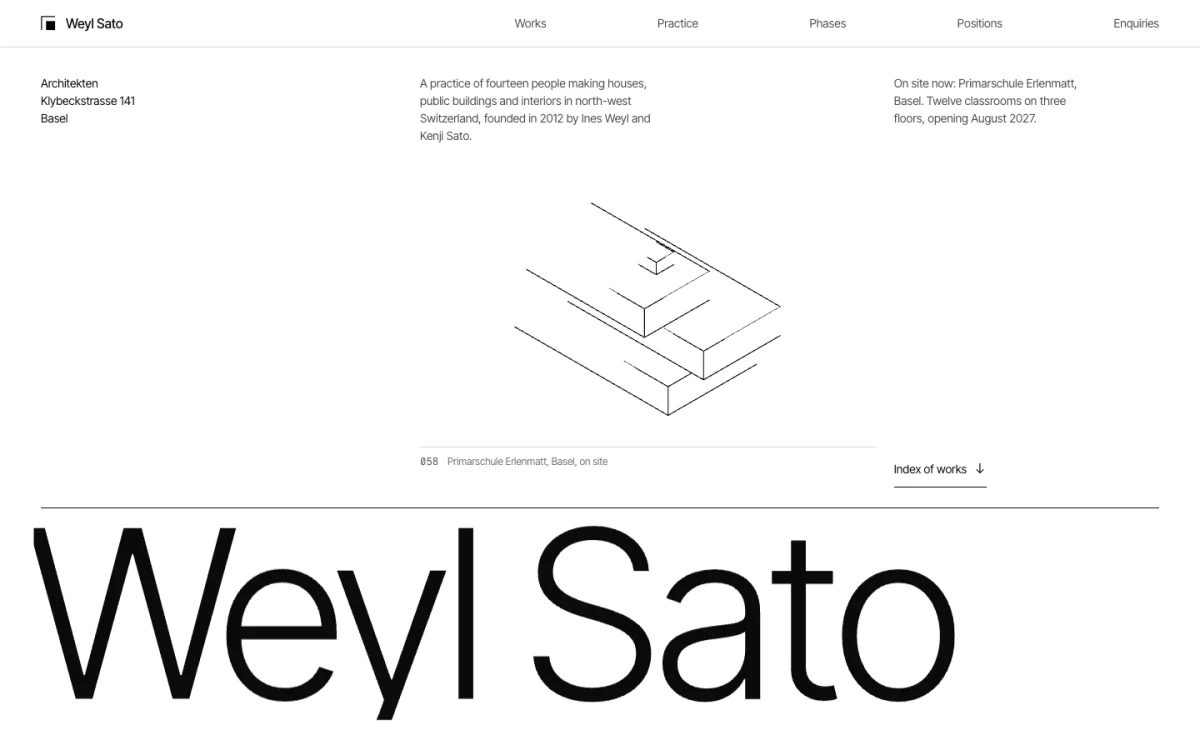
A minimalist architectural monograph: white paper, black ink, hairline rules and a rigorous 12-column grid, small precise type set against a few very large words, and every building shown as a line drawing.
The page is the opening of an architect's monograph. The practice's name runs the full width of the first screen in very large light type above a black hairline, with three small columns of plain facts above it. Everything else hangs from one 12-column grid: section names sit in the first three columns, content starts in the fourth.
The index of works is a typographic list of ten projects with number, place, typology, status, year and floor area. Pointing at a row brings that building's axonometric line drawing to the pointer and lets it trail smoothly behind; the list filters by houses, public, interiors and unbuilt, sorts by name, year or area, and switches to a grid of drawings, all moved with GSAP Flip. Choosing a project opens its sheet through a view transition in which the row's name becomes the title, and the ground floor plan draws itself wall by wall beside the facts and a short text. On a phone a tap opens the drawing under the row.
Below are the practice statement in large type, the three partners as a typographic table, the six phases of work in order, awards and publications as plain lists, two open positions, and an enquiry form for project type, budget, site and message with inline validation, sending, error and success. There are no photographs and no accent colour: only black, white and two greys.
The brand is fictional: Weyl Sato Architekten, a practice of fourteen people in Basel run by Ines Weyl, Kenji Sato and Mara Oyelaran. Names, people and figures on the page are invented.
What works
- Index of works: the hovered row's axonometric follows the pointer; keyboard focus shows it beside the row
- Filter by typology with counts, animated with GSAP Flip
- Sort by project name, year or floor area from the column heads
- Switch between the list and a grid of drawings (Flip)
- Project sheets: view transition from the row name to the title, self-drawing plan, previous / next, arrow keys, Escape and Back close
- Reduced motion: no pointer follow, the drawing sits in a fixed slot beside the list; plans appear already drawn
- Phones: a tap opens the drawing inline under the row with a button to the sheet
- Enquiry form: project type and budget choices, site, name, email, message counter, inline validation, sending, error and success with reference and reply date
- Open positions as an accordion; phone menu; 12-column grid overlay (footer button or the G key)
States you can link to
script.js reads these from the URL, so you can open the page in a given state to review it, screenshot it or show it to an agent.
| Parameter | What it does |
|---|---|
?view=grid | opens the index as a grid of drawings. Open ?view=grid |
?filter=unbuilt | filters the index (houses, public, interiors, unbuilt). Open ?filter=unbuilt |
?sort=area | sorts the index by floor area (also name, year). Open ?sort=area |
?work=liestal | opens a project sheet with its plan drawing itself (any slug: erlenmatt, rebberg, liestal, spalenberg, rheinbord, binningen, ollon, kreuzlingen, arlesheim, weissenstein). Open ?work=liestal |
?open=rebberg | on a phone, opens a row's drawing inline under it. Open ?open=rebberg |
?state=invalid | submits the empty enquiry form to show every inline error. Open ?state=invalid |
?state=sending | fills the form and holds it in the sending state. Open ?state=sending |
?state=success | fills and sends the form and shows the received confirmation. Open ?state=success |
?state=error | fills and sends the form and shows the failed-to-send message; the next attempt succeeds. Open ?state=error |
?grid=1 | shows the 12-column grid overlay. Open ?grid=1 |
?menu=open | on a phone, opens the menu. Open ?menu=open |
Use it
Copy templates/atelier/ into your project, or download the zip, which has the Screenery badge script already removed. Colours, type, spacing and radii are custom properties at the top of style.css. This template loads no libraries: only its own files and web fonts.
The docs explain the token pattern and how to move a template into React, Vue, Svelte or Astro. The guide has prompts for handing it to a coding agent.
Inspection
Loaded in Chromium 156.0.8078.4 (Playwright, headless) on 27 November 2026 at 1440, 1024, 768, 390 pixels wide and once more with reduced motion requested. Every check passed at every width.
- 1440 px
- Pass
- 1024 px
- Pass
- 768 px
- Pass
- 390 px
- Pass
- Reduced motion
- Pass
- Page weight
- 293 KB, 9 requests
Requests and transferred size were measured at 1440 pixels on a cold cache and include web fonts and any CDN library. The full result is in the viewer: open the Checks panel. How templates are checked.