Pebbo
Learning app screens template · App screens
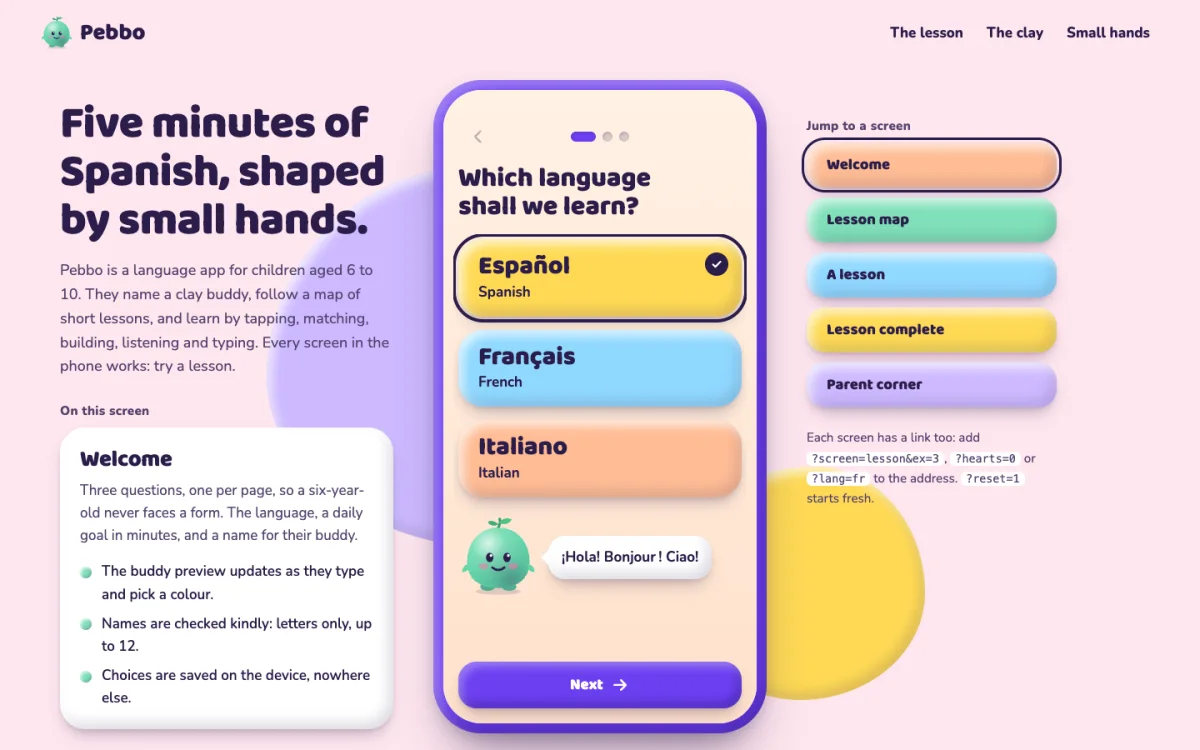
Modelling clay: candy-coloured puffy shapes lit from the top left, a pebble buddy with a sprout, and buttons that squash under a thumb and spring back.
A working children's language app in a puffy grape phone, with notes beside it that follow whichever screen is open. The welcome asks three questions one page at a time: which language, how many minutes a day, and a name and colour for the clay buddy, whose face changes as the name is typed. The map is one winding path of lessons. Finished ones wear their stars, the next one bounces, and the rest wait behind a lock.
The Fruit lesson is five real exercises: tap the picture for a word, match pictures to words, build a sentence by dragging or tapping clay tiles, listen and choose with the device's own voice (or the word spelled the way it sounds when there is none), and type the answer with checking that forgives accents, the article and one slipped letter. Hearts drop on wrong answers, feedback slides up with the right answer, and running out of hearts is a rest, not a loss. The end is a burst of clay confetti with XP, stars and minutes that add up.
Grown-ups get in by answering a multiplication. The parent corner draws the week as minutes against the daily goal in SVG and holds the settings: sound, reading aloud, a reminder, calm mode and starting over. Everything is saved on the device. Every surface is a flat colour with three box shadows; there are no images.
The brand is fictional: Pebbo, a Spanish, French and Italian app for children aged 6 to 10. Names, people and figures on the page are invented.
What works
- Welcome: pick a language and a daily goal, name and colour the buddy, inline name validation, loading state
- Lesson map: finished lessons show their words in a sheet, the current one starts the lesson, locked ones explain why
- Tap the picture, listen and choose: select, check, right and wrong feedback with the answer
- Match pairs: checked as you go, wrong pairs wobble and cost a heart
- Build a sentence: drag tiles onto the line at any position, or tap to add and remove
- Listen: speechSynthesis at normal and slow speed, with a spelled-out fallback
- Type it: tolerant checking (accents, article, one typo) and Enter to check
- Hearts, progress bar, leave-lesson confirmation, out-of-hearts rest
- Lesson complete: canvas confetti (still under reduced motion or calm mode), stars, XP, minutes, streak
- Parental gate: a new multiplication each visit, three tries
- Parent corner: weekly SVG chart, switches, daily goal select, start-over confirmation
- Screen switcher beside the phone; Escape closes sheets; squishable clay button in the page
States you can link to
script.js reads these from the URL, so you can open the page in a given state to review it, screenshot it or show it to an agent.
| Parameter | What it does |
|---|---|
?screen=welcome | the three-step welcome. Open ?screen=welcome |
?screen=home | the lesson map with three lessons finished and Fruit next. Open ?screen=home |
?screen=lesson | starts the Fruit lesson at the first exercise. Open ?screen=lesson |
?screen=lesson&ex=3 | jumps to an exercise (1 pick, 2 match, 3 build, 4 listen, 5 type). Open ?screen=lesson&ex=3 |
?screen=lesson&hearts=0 | the out-of-hearts rest. Open ?screen=lesson&hearts=0 |
?screen=done | lesson complete with a demo result: 50 XP, two stars, 4 of 5 right first time. Open ?screen=done |
?screen=gate | the parental maths gate. Open ?screen=gate |
?screen=parents | the parent corner, past the gate. Open ?screen=parents |
?lang=fr | switches the content to French (or it for Italian, es for Spanish). Open ?lang=fr |
?reset=1 | clears the saved profile and starts fresh. Open ?reset=1 |
Use it
Copy templates/clay/ into your project, or download the zip, which has the Screenery badge script already removed. Colours, type, spacing and radii are custom properties at the top of style.css. This template loads no libraries: only its own files and web fonts.
The docs explain the token pattern and how to move a template into React, Vue, Svelte or Astro. The guide has prompts for handing it to a coding agent.
Inspection
Loaded in Chromium 156.0.8078.4 (Playwright, headless) on 27 November 2026 at 1440, 1024, 768, 390 pixels wide and once more with reduced motion requested. Every check passed at every width.
- 1440 px
- Pass
- 1024 px
- Pass
- 768 px
- Pass
- 390 px
- Pass
- Reduced motion
- Pass
- Page weight
- 197 KB, 7 requests
Requests and transferred size were measured at 1440 pixels on a cold cache and include web fonts and any CDN library. The full result is in the viewer: open the Checks panel. How templates are checked.