Kestrel K2
Drone product page template · Shops and makers
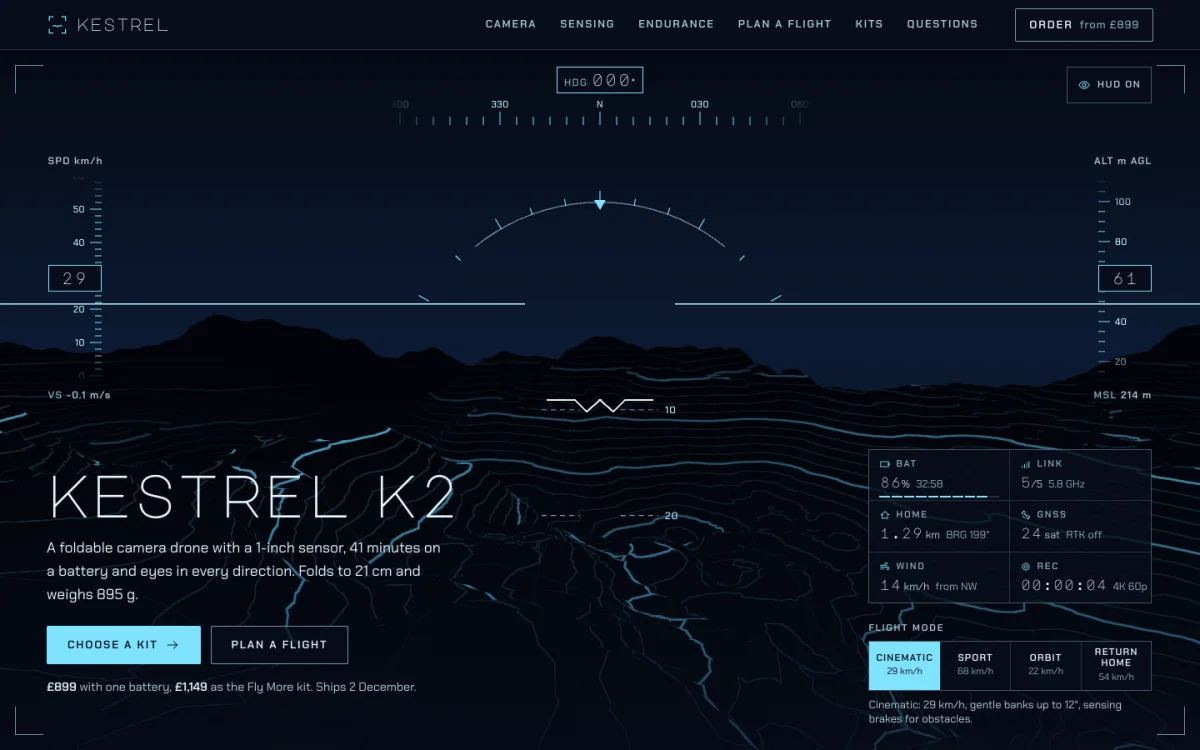
The pilot's display: thin cyan-white vector lines on deep night blue, corner brackets, tick rulers, speed and altitude tapes, a compass strip and small uppercase labels, with amber kept for warnings alone.
The first screen is the flight view. three.js flies a camera over procedural terrain drawn as glowing contour lines in fog, and an HTML and SVG HUD sits on top: a compass strip, speed and altitude tapes, a roll scale and pitch ladder, battery, link, distance home, satellites, wind and a record timer. One simulation drives both, so when you move the pointer or press the arrow keys the drone banks, the 3D horizon and the HUD horizon tilt together, the heading turns at the rate a coordinated turn gives and the altitude tape follows the ground beneath. Four flight modes change all of it: Cinematic, Sport, Orbit around the point ahead, and Return home, which climbs to 80 m and turns for the take-off point.
Below the flight view the camera is laid out as HUD panels: the sensor drawn to scale against a phone sensor, the specifications, and four video modes that redraw the frame guide and work out bitrate, gigabytes a minute, minutes on the card and what one battery's flight fills. Obstacle sensing is a radar with a turning sweep and a braking ring that grows with the speed you set; switch to Sport and it turns amber because the drone will no longer brake. Endurance multiplies batteries by minutes on a ruler for still air, breeze and gusts, with charging time to match.
The pre-flight check takes the site, wind, gusts, height, planned minutes, batteries, a restriction-zone switch with a permission reference and the walk-round, validates each field with a specific message, then after a short check returns go, go with care or no-go with every reason. Then the two kits compared with prices that add up, the order box with kit, care plan, delivery, email and postcode validation, loading, error and success, questions and the footer. Without WebGL, or with reduced motion, a drawn contour map of the same terrain sits under the same HUD.
The brand is fictional: Kestrel K2, a foldable 895 g camera drone with a 1-inch sensor from Kestrel Aerial in Bristol. Names, people and figures on the page are invented.
What works
- Flight view: pointer position or Left and Right arrow keys bank the drone; Up and Down change height; camera roll and HUD horizon tilt together and heading follows the bank
- Flight modes: Cinematic, Sport, Orbit and Return home change speed, height, camera pitch, banking and every HUD readout
- HUD on and off button; amber warning bar for low battery and for Sport mode braking off; auto return home at 15%
- Video modes: frame guide, bitrate, GB a minute, minutes on a 128 GB card and GB per battery; the HUD record format follows
- Braking distance slider with Sport toggle: radar ring, reaction and braking distance, spare range, amber when braking is off
- Endurance: batteries and conditions recompute the ruler, total time and charging time
- Pre-flight check: inline validation, restriction zone switch with reference format check, loading, go, go with care and no-go with reasons
- Order: kit, K2 Care and delivery update the total; email and postcode validation; loading, error with retry, success with order number and start again
- Questions accordion
States you can link to
script.js reads these from the URL, so you can open the page in a given state to review it, screenshot it or show it to an agent.
| Parameter | What it does |
|---|---|
?mode=sport | opens in Sport mode: 68 km/h, steeper banks, amber braking-off warning. Open ?mode=sport |
?mode=orbit | opens circling the point ahead. Open ?mode=orbit |
?mode=rth | opens returning home: climbs to 80 m and turns for the take-off point. Open ?mode=rth |
?state=lowbattery | battery at 18%: amber battery readout and warning bar; at 15% it returns home on its own. Open ?state=lowbattery |
?state=error | fills the order and submits; the payment service does not answer, submitting again succeeds. Open ?state=error |
?state=success | fills the order and submits to the confirmation. Open ?state=success |
?hud=off | hides the HUD instruments, leaving the terrain and the mode selector. Open ?hud=off |
?plan=nogo | a pre-flight check at Nethercott in 41 km/h wind that comes back no-go with six reasons. Open ?plan=nogo |
?plan=go | a pre-flight check at Cuckmere Meadows that comes back go. Open ?plan=go |
?nogl | skips WebGL and shows the drawn contour map under the HUD. Open ?nogl |
Use it
Copy templates/drone/ into your project, or download the zip, which has the Screenery badge script already removed. Colours, type, spacing and radii are custom properties at the top of style.css. This template loads no libraries: only its own files and web fonts.
The docs explain the token pattern and how to move a template into React, Vue, Svelte or Astro. The guide has prompts for handing it to a coding agent.
Inspection
Loaded in Chromium 156.0.8078.4 (Playwright, headless) on 27 November 2026 at 1440, 1024, 768, 390 pixels wide and once more with reduced motion requested. Every check passed at every width.
- 1440 px
- Pass
- 1024 px
- Pass
- 768 px
- Pass
- 390 px
- Pass
- Reduced motion
- Pass
- Page weight
- 409 KB, 11 requests
Requests and transferred size were measured at 1440 pixels on a cold cache and include web fonts and any CDN library. The full result is in the viewer: open the Checks panel. How templates are checked.