Murmur
AI product landing page template · Software and web
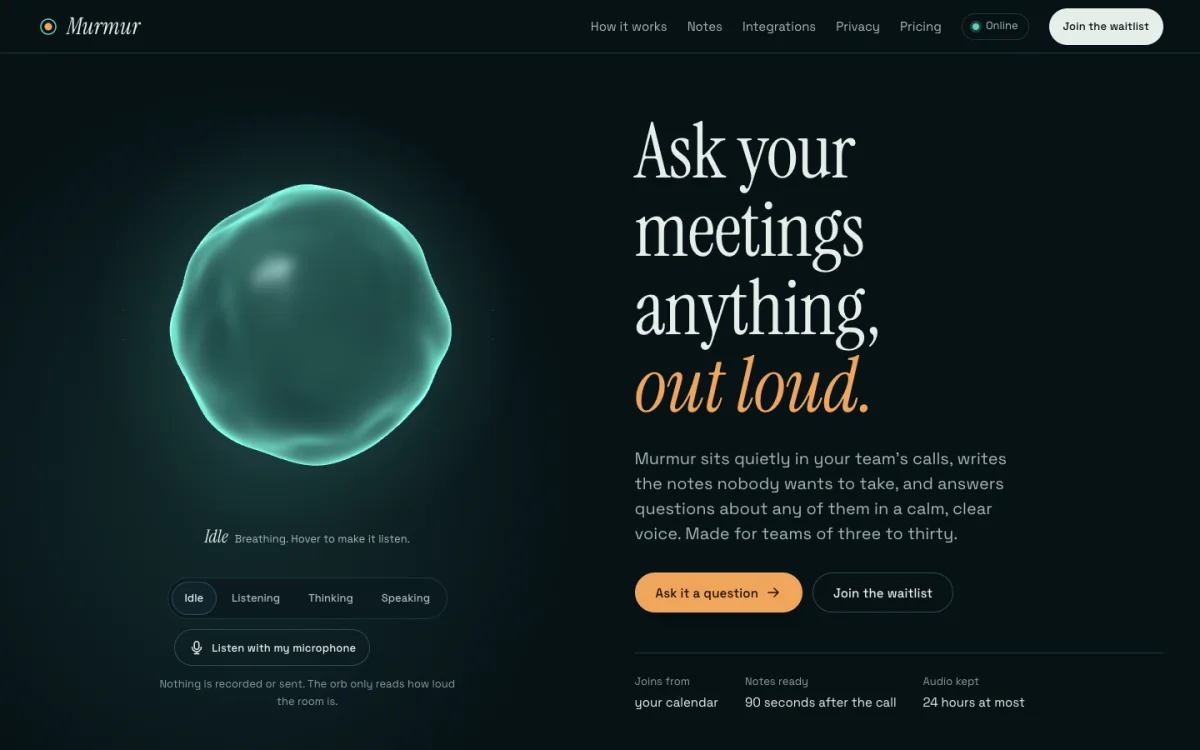
A dark room at night with one living light: a near-black ink-teal ground, a tide-teal orb that breathes, listens, thinks and speaks, and a warm amber kept for the voice.
The page is a dark room with one light in it. That light is the orb, rendered live in three.js with a custom shader: an icosphere pushed around by simplex noise, lit at its edges by fresnel and wrapped in a soft glow. It has four moods. Idle, it breathes. Listening, rings travel across it from wherever your pointer is, or from the room's loudness if you press the microphone button and allow it. Thinking, the surface swirls. Speaking, it turns amber and swells in time with the words. The palette is deliberate: teal ink is the quiet of a call that is being listened to, and amber is the warmth of a human voice, so the page avoids the usual violet AI gradient.
Beside the orb, the demo asks Murmur about a real-feeling week at a twelve-person studio. Pick one of three questions and the orb moves through listening, thinking and speaking while the transcript writes itself with timestamps, the waveform follows the same speech envelope as the orb, and the answer cites the minute it came from. Stop interrupts it at any point.
Below are the three moments of one meeting on a timeline, the notes Murmur wrote for it (tick off action items, select a timestamp to read the line it came from, copy as Markdown), eight fictional integrations with the exact permissions each asks for, the privacy rules with a proportional chart of how long audio, transcripts and notes are kept, pricing with a monthly or yearly toggle and a seat stepper whose totals add up, and a waitlist form with inline validation, loading, error and success. Without WebGL, or with reduced motion, the orb is a CSS gradient sphere that changes state by class.
The brand is fictional: Murmur, a voice assistant for small teams from Murmur Labs in Bristol: it joins calls, writes the notes and answers questions about any meeting out loud. Names, people and figures on the page are invented.
What works
- Orb: hover to make it listen, ripples aim at the pointer on the sphere
- Orb state preview: Idle, Listening, Thinking, Speaking radios with arrow keys
- Microphone: opt-in getUserMedia level drives the listening ripples, with blocked, missing and unsupported states
- Demo: three questions run listening, thinking and speaking with a typed transcript, timestamps, waveform, cited source and Stop (Escape also stops)
- Offline state with a reconnect button that recovers
- Meeting notes: tick action items with a live count, timestamps open the transcript excerpt, copy as Markdown
- Integrations: choose one to read what it does and the permissions it asks for
- Pricing: monthly or yearly, a 1 to 30 seat stepper, totals and savings per plan; picking a plan carries it to the waitlist
- Waitlist: inline validation with specific messages, loading, error with retry, success with place in line and reference, add another team
- Mobile menu with Escape to close
States you can link to
script.js reads these from the URL, so you can open the page in a given state to review it, screenshot it or show it to an agent.
| Parameter | What it does |
|---|---|
?orb=listening | holds the orb in its listening state, ripples running. Open ?orb=listening |
?orb=thinking | holds the orb in its thinking swirl. Open ?orb=thinking |
?orb=speaking | holds the orb speaking, amber, pulsing to a simulated voice. Open ?orb=speaking |
?state=error | the assistant is offline: grey orb, offline status, questions disabled, reconnect recovers. Open ?state=error |
?billing=yearly | pricing opens on yearly billing with yearly totals and savings. Open ?billing=yearly |
?demo=2 | runs the demo for a question on load (1, 2 or 3). Open ?demo=2 |
?waitlist=success | fills and sends the waitlist form and shows the place in line. Open ?waitlist=success |
?waitlist=error | fills and sends the form, the waitlist cannot be reached; sending again succeeds. Open ?waitlist=error |
?mic=denied | shows the microphone permission-denied message. Open ?mic=denied |
?nogl | skips WebGL and shows the CSS orb with the same states. Open ?nogl |
Use it
Copy templates/oracle/ into your project, or download the zip, which has the Screenery badge script already removed. Colours, type, spacing and radii are custom properties at the top of style.css. This template loads no libraries: only its own files and web fonts.
The docs explain the token pattern and how to move a template into React, Vue, Svelte or Astro. The guide has prompts for handing it to a coding agent.
Inspection
Loaded in Chromium 156.0.8078.4 (Playwright, headless) on 27 November 2026 at 1440, 1024, 768, 390 pixels wide and once more with reduced motion requested. Every check passed at every width.
- 1440 px
- Pass
- 1024 px
- Pass
- 768 px
- Pass
- 390 px
- Pass
- Reduced motion
- Pass
- Page weight
- 376 KB, 9 requests
Requests and transferred size were measured at 1440 pixels on a cold cache and include web fonts and any CDN library. The full result is in the viewer: open the Checks panel. How templates are checked.