lathe
Developer tool landing page template · Software and web
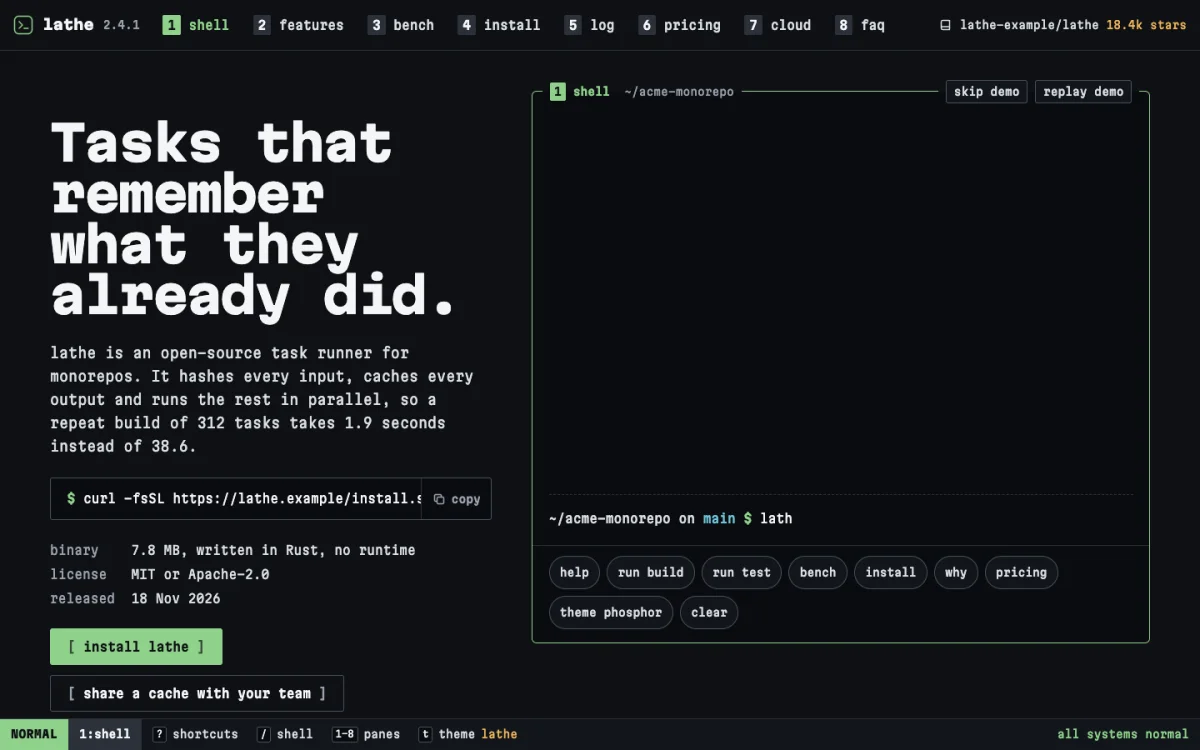
A modern terminal session in the htop and lazygit tradition: every section is a pane with its title set into the frame, one monospace family on a character grid, four ANSI accents, and a shell you can actually type into.
The page is one terminal session. The top bar is a tmux-style window list, every section is a pane whose title sits in its border, and whichever pane is in view takes the green focus colour, the way lazygit marks the active panel. The hero is a working shell: on load it types lathe run build and lathe why by itself, then hands the prompt to the visitor. Help, install, run, why, bench, pricing, theme, goto, history and clear all stream scripted, realistic output with text spinners and progress bars sized to the pane, and Tab, the arrow keys, Ctrl+L and Ctrl+C behave as they would in a real shell.
Below the shell, the features are a docs folder: pick a file in the tree and the preview pane shows its explanation and code. The bench pane draws three runners in three situations as bars snapped to eighths of a character cell, from the same numbers the shell's bench command prints. Then install tabs with copy buttons, the changelog as a git log graph you can filter by commit type, a pricing table with a monthly or yearly toggle and a seat count whose totals add up, the Lathe Cloud signup as a TUI form with inline validation, a streamed provisioning log, an error with retry and a success with the commands to run next, the FAQ as a collapsible tree, the maintainers file and a status bar with keyboard hints.
Everything is set in Martian Mono, using its width axis instead of a second family. Pane frames, tree guides and bars are drawn in CSS on the character grid; terminal output stays in plain ASCII the way cargo and htop draw it. There are no images. Without JavaScript the static transcript, every doc and every install panel are on the page; with reduced motion the shell shows its finished output and commands print at once.
The brand is fictional: lathe, an open-source local-first task runner for monorepos, with Lathe Cloud as the paid shared cache. Names, people and figures on the page are invented.
What works
- Shell: type commands, Tab completion, up and down history, Ctrl+L clears, Ctrl+C stops a running task (try run dev)
- Self-typing demo on load: skip it, type over it, or replay it
- Tappable command chips and a phone extra-keys row (tab, up, down, ctrl-c, ctrl-l)
- Features file tree with arrow-key navigation and a preview pane
- Bench situations (cold, edit one file, fresh CI runner), also driven by the shell's bench command
- Install tabs per platform with copy buttons; the OS is detected
- Changelog git graph filter by feat, fix and perf
- Pricing: monthly or yearly, seat stepper, per-plan totals with seat minimums and yearly savings; plan picker on phones
- Cloud signup: slug, work email, plan, seats, region and terms with inline validation, a streamed loading log, error with retry or another region, success with copyable commands
- FAQ tree of collapsible questions
- Keyboard: ? shortcuts dialog, / shell, 1 to 8 panes, j and k next and previous pane, t cycles the theme, Esc closes
States you can link to
script.js reads these from the URL, so you can open the page in a given state to review it, screenshot it or show it to an agent.
| Parameter | What it does |
|---|---|
?theme=phosphor | amber monochrome phosphor theme (also paper for the light theme); remembered for the next visit. Open ?theme=phosphor |
?demo=off | skips the self-typing demo and shows the finished transcript. Open ?demo=off |
?cmd=bench | runs any shell command on load instead of the demo, for example ?cmd=help or ?cmd=install%20windows. Open ?cmd=bench |
?file=watch | opens a file in the features tree (toml, graph, local, remote, watch, why, sandbox). Open ?file=watch |
?scenario=ci | shows the bench for a fresh CI runner (cold, edit or ci). Open ?scenario=ci |
?os=windows | selects an install tab (macos, linux, windows, npm). Open ?os=windows |
?billing=yearly&seats=24 | pricing billed yearly for 24 seats. Open ?billing=yearly&seats=24 |
?state=loading | fills the cloud form and holds it on the provisioning log. Open ?state=loading |
?state=error | fills and submits the cloud form, the cache region times out, retry is offered. Open ?state=error |
?state=success | fills and submits the cloud form through to the ready workspace and its commands. Open ?state=success |
?open=keys | opens the keyboard shortcuts dialog. Open ?open=keys |
Use it
Copy templates/terminal/ into your project, or download the zip, which has the Screenery badge script already removed. Colours, type, spacing and radii are custom properties at the top of style.css. This template loads no libraries: only its own files and web fonts.
The docs explain the token pattern and how to move a template into React, Vue, Svelte or Astro. The guide has prompts for handing it to a coding agent.
Inspection
Loaded in Chromium 156.0.8078.4 (Playwright, headless) on 27 November 2026 at 1440, 1024, 768, 390 pixels wide and once more with reduced motion requested. Every check passed at every width.
- 1440 px
- Pass
- 1024 px
- Pass
- 768 px
- Pass
- 390 px
- Pass
- Reduced motion
- Pass
- Page weight
- 175 KB, 6 requests
Requests and transferred size were measured at 1440 pixels on a cold cache and include web fonts and any CDN library. The full result is in the viewer: open the Checks panel. How templates are checked.